
What Is Browser Fingerprinting? A Sneaker Botting Guide
Browser fingerprinting is a method websites use to identify or classify a browser by combining characteristics of its software, hardware, and configuration. Instead of relying only on cookies or an IP address, a site can examine multiple browser signals and how they fit together. Mozilla’s MDN documentation lists examples including browser version, timezone, language, fonts, codecs, settings, and display resolution.
For sneaker botters, this matters because modern anti-bot systems don’t just ask, “What IP sent this request?” They can also look at the browser environment behind it. TSB’s guide to how sneaker websites detect bots explains how browser characteristics now sit alongside IP reputation, request patterns, JavaScript results, TLS fingerprints, and session behavior.
What Makes Up a Browser Fingerprint?
A browser fingerprint is built from multiple signals that describe how a browser and device look to a website. No single value necessarily identifies a visitor. The combination is what makes fingerprinting useful.
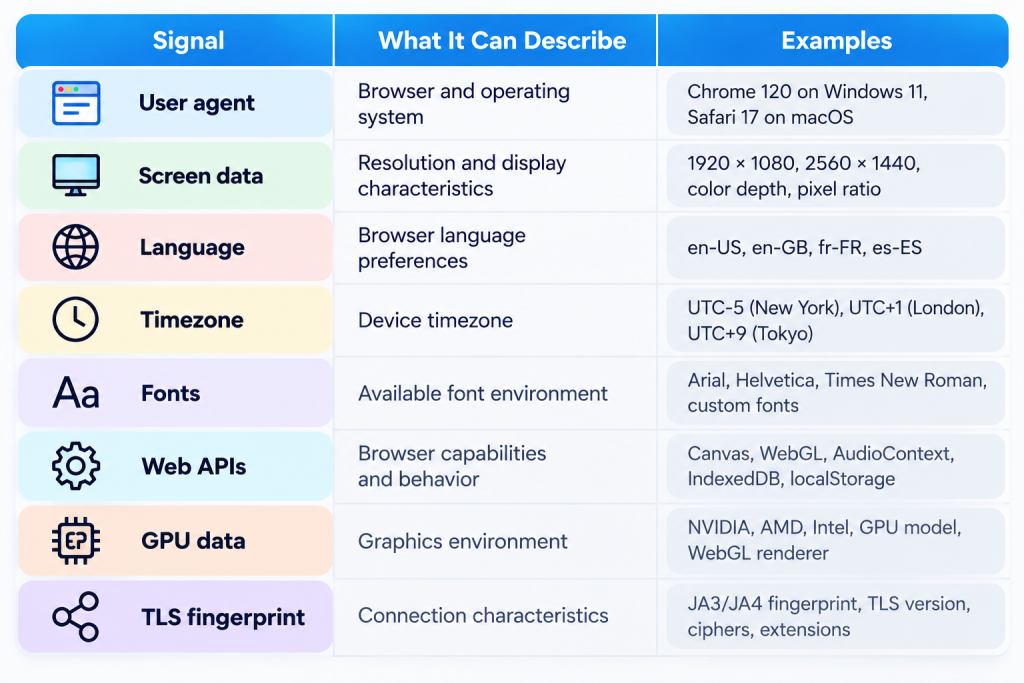
The exact data collected depends on the website and protection system. DataDome, for example, documents collecting browser, OS, GPU, behavioral, and consistency signals through its JavaScript integration. Cloudflare separately documents JA3 and JA4 fingerprints for identifying TLS clients by connection characteristics.
So yeah, your IP is only one piece of the puzzle.
Why Does Browser Fingerprinting Matter for Sneaker Bots?
Browser fingerprinting matters because retailers can compare what a client claims to be with how that client actually behaves. An inconsistent browser environment can become another signal that a session deserves scrutiny.
This is especially relevant when you understand how sneaker bots work. Bots automate actions at a scale and speed that manual shoppers usually don’t. Modern protection systems therefore combine several signals instead of relying on one obvious bot flag.
Cloudflare’s latest documentation says its bot detection stack uses heuristics, JavaScript detections, machine learning, and known malicious fingerprints. Its JavaScript detection system specifically targets headless browsers and other suspicious fingerprints.
Fingerprinting ain’t the whole anti-bot game. But it’s definitely part of it.
Is Changing Your IP Enough to Change Your Fingerprint?
No. Changing an IP address doesn’t automatically change the browser fingerprint because IP and browser characteristics are separate signals.
That’s an important distinction when working with sneaker proxies. A proxy changes how your connection reaches the retailer, while browser fingerprinting can involve information exposed by the browser or device itself.
Cloudflare’s documentation makes that separation especially clear with JA3 and JA4. These TLS fingerprints identify client connection characteristics and can remain useful across different destination IPs, ports, and certificates.
That doesn’t make proxies useless. Far from it. IP reputation, location, response time, session stability, accounts, and the rest of your sneaker bot setup still matter. They just aren’t substitutes for every other signal a retailer can check.
How Do Anti-Bot Systems Use Fingerprints?
Anti-bot systems use fingerprints as one input in a larger decision about whether traffic looks legitimate or automated. Modern detection is layered.
Cloudflare documents browser-based challenges that evaluate client-side signals, while its JavaScript Detections can gather signals without interrupting every visitor with a visible challenge.
That’s why CAPTCHA isn’t the entire story anymore. A retailer may already have browser, network, request, and session information before deciding whether additional verification is necessary.
For botters, the useful mental model is simple:
Browser fingerprint + network signals + request behavior + session behavior = a much fuller picture than IP alone.
The exact weighting and rules vary by retailer and anti-bot provider.
Does a Good Fingerprint Guarantee Your Bot Won’t Get Detected?
No. A normal-looking browser fingerprint cannot guarantee that automated traffic will pass a retailer’s anti-bot system.
A session can look fine in one area and still produce suspicious signals somewhere else. Cloudflare explicitly uses multiple detection engines because sophisticated bots require more than simple signature matching.
That’s the big lesson for sneaker botting in 2026. Fingerprinting isn’t some isolated trick you fix once and forget about. It’s one part of the broader session retailers evaluate.
If you’re troubleshooting blocks, don’t stare at one variable. Look at the complete setup: browser signals, proxies, accounts, task behavior, connection consistency, and retailer responses. Understanding browser fingerprinting simply gives you a better idea of what can be happening behind the scenes when a drop doesn’t go your way.
The Final Print: Leave Your Mark on the Next Drop
Every browser can leave its own digital fingerprint, but TSB has built its reputation on a different kind of mark: results.
With 1M+ items secured and $50M+ in profit generated by members overall, TSB has the track record to back the talk.
If you’re ready to leave your mark on the next hyped drop, make sure your TSB key is ready when opportunity puts its fingerprint on the door.