
 Sneaker bot sessions are the collection of state a retailer uses to recognize activity across multiple requests. Cookies, authentication data, challenge tokens, account state, browser signals, and sometimes network characteristics can all contribute. A bot cannot treat every request as completely independent and expect the retailer to see one continuous shopping journey.
The key distinction is that a cookie, a token, and a session aren’t three names for the same thing. A cookie carries stored state, a token can prove authorization or completion of a check, and the session provides the broader context that connects those pieces through login, product access, queues, carting, and checkout.
What Is a Sneaker Bot Session?
A sneaker bot session is the continuing state associated with a task or shopping flow across multiple requests. HTTP itself is stateless, so one request doesn’t automatically remember the request before it. Websites add state so they can recognize that the shopper who logged in is also the shopper requesting a product or proceeding toward checkout.
Cookies are one common mechanism. Mozilla’s HTTP documentation explains that a server can send a cookie using a Set-Cookie response header, after which the client returns applicable cookies on later requests.
For botters, think of the session as the whole conversation, while each HTTP request is one message in that conversation.
Retailers can evaluate more than cookies. As our guide to how sneaker websites detect bots explains, browser characteristics, request behavior, IP reputation, JavaScript results, and other signals can contribute to how traffic is treated.
Cookies, Tokens, and Session State Are Different Things
Cookies, tokens, and session state overlap, but they have different jobs. Losing one type of state can therefore have a completely different effect from losing another.
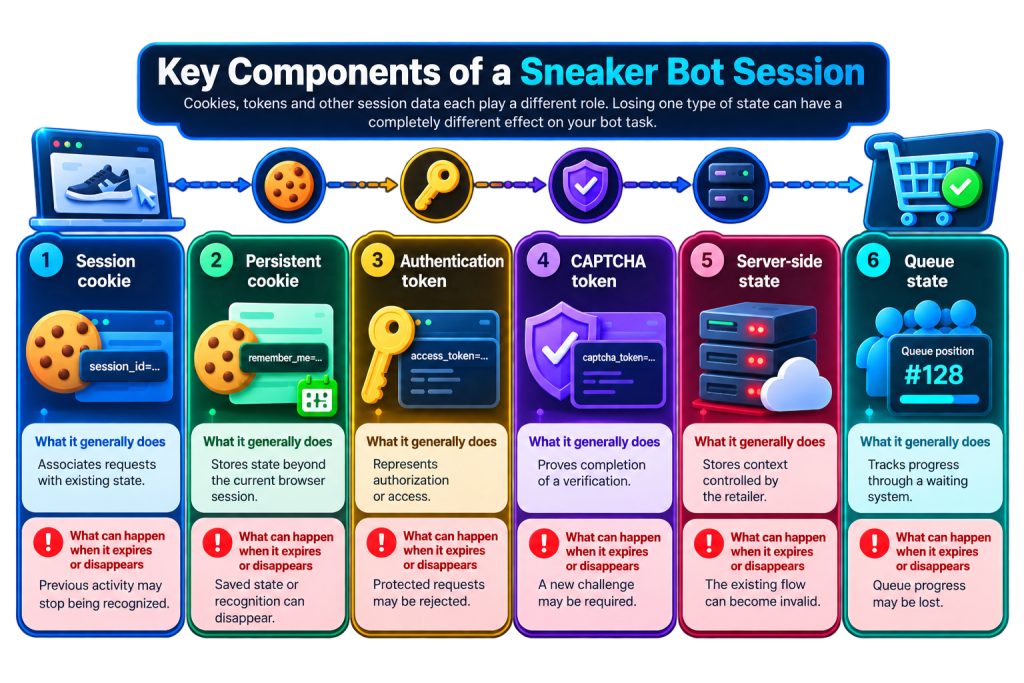
| Component | What it generally does | What can happen when it expires or disappears |
|---|---|---|
| Session cookie | Associates requests with existing state. | Previous activity may stop being recognized. |
| Persistent cookie | Stores state beyond the current browser session. | Saved state or recognition can disappear. |
| Authentication token | Represents authorization or access. | Protected requests may be rejected. |
| CAPTCHA token | Proves completion of a verification. | A new challenge may be required. |
| Server-side state | Stores context controlled by the retailer. | The existing flow can become invalid. |
| Queue state | Tracks progress through a waiting system. | Queue progress may be lost. |
The exact implementation varies between retailers. There’s no universal sneaker-site session format.
That’s also why copying one cookie doesn’t necessarily reproduce everything a retailer knows about the original task.
How Do Cookies Keep a Sneaker Bot Session Alive?
Cookies allow relevant state to move from one request to another. A retailer sends them in its response, and the client stores and returns applicable values on later requests according to rules such as domain, path, security settings, and expiry.
Not every cookie lasts the same amount of time. Mozilla distinguishes session cookies from persistent cookies. A cookie without Expires or Max-Age is generally treated as a session cookie, while one with an expiry can persist longer.
Cookies can also use attributes such as Secure, HttpOnly, and SameSite, which affect how they are sent or accessed.
So when a sneaker bot maintains a session, that doesn’t necessarily mean it is keeping one cookie alive. A working flow can involve several cookies with different purposes and lifetimes.
Are Authentication Tokens the Same as Cookies?
Authentication tokens are credentials or proofs, while cookies are one mechanism web applications use to store and transport state. A token can be stored inside a cookie, but that doesn’t make the concepts interchangeable.
Websites can also pass authorization through HTTP headers or maintain meaningful account state on the server while the browser holds only a session identifier.
This distinction matters as a bot moves from login to later actions. A task might still possess its cookies while no longer having valid authorization for the next protected request.
A useful rule is simple: having session data doesn’t prove that every part of that data is still valid.
That’s one reason session problems can appear halfway through a task rather than immediately after login.
Where Do CAPTCHA Tokens Fit Into the Session?
CAPTCHA tokens are generally short-lived proof that a particular verification succeeded. They shouldn’t be confused with the broader state keeping an account recognized through the shopping flow.
The documented lifetimes show how short that window can be. Google states that reCAPTCHA v3 tokens expire after 2 minutes. Cloudflare documents a 300-second, or 5-minute, lifetime for Turnstile tokens and says each token can be validated only once.
Those figures are specific to those providers, not universal sneaker-site limits.
Our guide to how CAPTCHAs work on sneaker websites covers the wider process. The session point is simpler: solving a challenge doesn’t provide permanent clearance. A task can retain valid account state and still require another verification later.
Why Can a Session Die When the Cookies Are Still There?
A session can fail because client-side cookies are only one part of the state a retailer controls. Keeping the same cookie values doesn’t force the server to continue accepting them.
Server-side state can expire. Authorization can be revoked. A challenge token can time out. A queue can close. Security systems can also request another verification after evaluating later activity.
This creates a familiar situation: a task looks healthy early in the flow, then gets challenged, redirected, logged out, or rejected.
The failure doesn’t necessarily mean the bot lost its cookies. It means the next step could not continue with the state available at that point.
Our article on sneaker queues illustrates the same principle. Passing one stage of a drop doesn’t guarantee acceptance at the next one.
Does Changing a Proxy Break a Sneaker Bot Session?
Changing a proxy changes the network path and public IP used by subsequent traffic. Whether that invalidates an existing session depends on the retailer and its security setup. There is no universal rule that every IP change kills every session.
A retailer or anti-bot system can evaluate network information alongside browser, account, request, and session behavior. Our guide to why sneaker proxies get banned or blocked makes the reverse point too: replacing an IP doesn’t necessarily rescue a bad session when something else in the flow is causing the problem.
A task can therefore retain its entire cookie jar while its IP changes. Technically, its cookies survived. Whether the retailer accepts the new combination of signals is a separate issue.
That makes “new IP equals new session” a poor troubleshooting rule.
Why Do Sticky Proxies Matter for Session Persistence?
Sticky proxies keep the same IP assigned for a period of time, reducing one source of change during a stateful workflow. They don’t make cookies live longer or prevent server-side sessions from expiring.
Suppose 20 account tasks are mapped across 20 stable proxy sessions:
20 accounts ÷ 20 proxy sessions = 1 account per proxy session
That mapping is easier to reason about than constantly changing the network route underneath each account. It still doesn’t guarantee that a retailer trusts those sessions.
Our sticky vs rotating proxies guide covers that difference in more detail. Sticky describes how long the proxy provider maintains an IP assignment. It doesn’t describe how long the retailer keeps a web session valid.
Two separate clocks are running, even though both are often casually described as sessions.
How Do Browser-Based and Request-Based Bots Handle Sessions?
Browser-based automation gets normal browser session machinery as part of its environment. The browser handles cookie storage, JavaScript execution, navigation state, and other web behavior that would otherwise need to be maintained separately.
Request-based automation communicates more directly with retailer endpoints. The application still has to preserve whatever state the workflow requires between those requests.
Our browser-based vs request-based sneaker bots comparison explains the wider difference. From a session perspective, both approaches require continuity, but they maintain it through different client environments.
This becomes especially relevant when a website expects state created through several stages of browser interaction. A request can be technically valid by itself while still failing because the wider sequence no longer makes sense to the server.
How Long Does a Sneaker Bot Session Last?
A sneaker bot session has no universal lifetime because its individual pieces can expire independently. The shortest-lived component required for the next action can effectively become the limit, even while other state remains valid.
Consider the two verified challenge examples:
- Google documents a 2-minute reCAPTCHA v3 token lifetime.
- Cloudflare documents a 300-second Turnstile token lifetime.
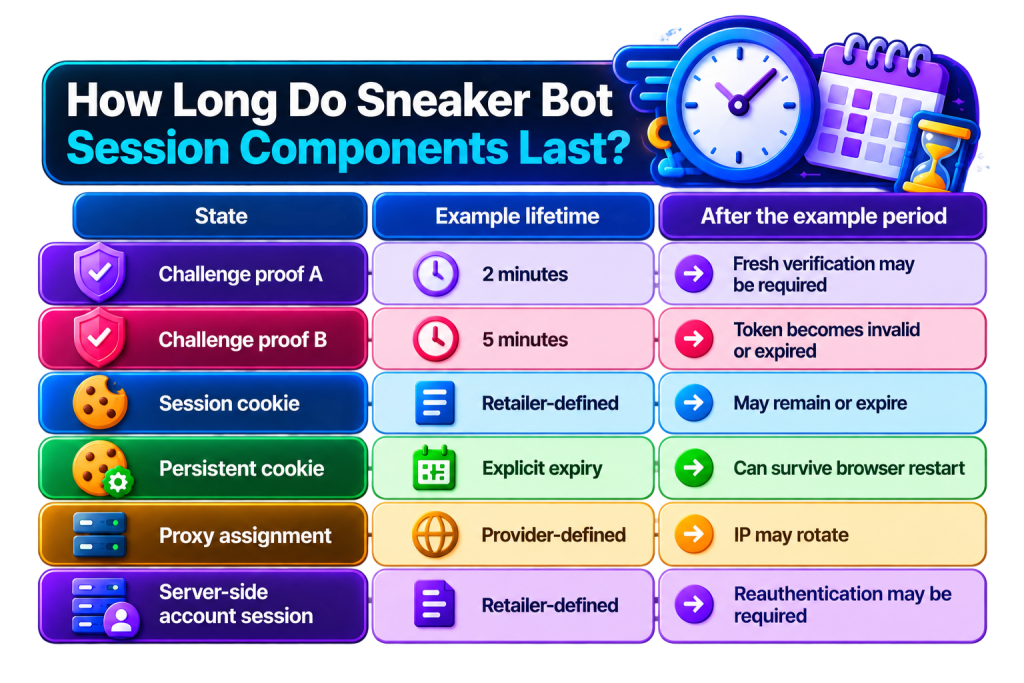
| State | Example lifetime | After the example period |
|---|---|---|
| Challenge proof A | 2 minutes | Fresh verification may be required |
| Challenge proof B | 5 minutes | Token becomes invalid or expired |
| Session cookie | Retailer-defined | May remain or expire |
| Persistent cookie | Explicit expiry | Can survive browser restart |
| Proxy assignment | Provider-defined | IP may rotate |
| Server-side account session | Retailer-defined | Reauthentication may be required |
Meanwhile, a cookie, account session, proxy assignment, or queue state can operate on a completely different schedule defined by its retailer or provider.
This is why asking “how long does the session last?” rarely has a useful single-number answer.
A better question is: which state does the next request require, and is that state still valid?
That tells you far more than the age of the task alone.
Why Session Persistence Explains Weird Bot Errors
Session persistence explains why two tasks that look identical can behave differently. By the time they reach the same endpoint, they may carry very different histories.
One could have a valid account session but an expired challenge. Another might have fresh challenge state but a changed network route. A third could retain its cookies while the retailer has invalidated the server-side state those cookies reference.
When troubleshooting, separate the layers:
- Network: Has the connection or IP changed?
- Cookies: Is expected client-side state still present?
- Authentication: Is the account still authorized?
- Challenge: Is required verification current?
- Server state: Does the retailer still recognize the flow?
- Environment: Have important client characteristics changed?
The last error displayed isn’t always where the problem started.
The Simple Way to Think About Sneaker Bot Sessions
Sneaker bot sessions are best understood as continuity, not as one cookie or token. Retailers receive separate requests and use different forms of state to determine how those requests relate to what happened before.
Cookies can carry identifiers and stored values. Authentication data can prove access. CAPTCHA tokens can prove recent verification. Server-side records can hold state the client never sees. Proxies determine the network route, while browser and request characteristics provide additional context.
Some pieces last minutes. Others can survive much longer. Some can be consumed after one use.
So when a sneaker bot session “dies,” asking whether the cookies still exist is only the start. The useful question is which part of the state stopped being valid, and which next action depended on it?
Stay Connected: The Session Story Behind Every Drop
Cookies, tokens, and session persistence might sound like separate pieces of tech, but together they help explain how a session keeps its connection from one step to the next. TSB has made plenty of connections of its own along the way, with 1M+ items secured and $50M+ in profit generated by members overall.
If sneaker bot sessions are another connection you’re starting to understand, your TSB key can be one more piece of the setup you bring to future drops.