
 CAPTCHAs on sneaker websites help separate legitimate shoppers from suspicious or automated traffic. Modern systems do much more than ask you to click traffic lights. They can evaluate browser and session signals, assign risk, run background challenges, and issue tokens that the retailer validates before allowing an action.
So when a CAPTCHA appears during a drop, the puzzle is only the part you can see. Most of the interesting stuff happens around it.
The basic flow looks like this:
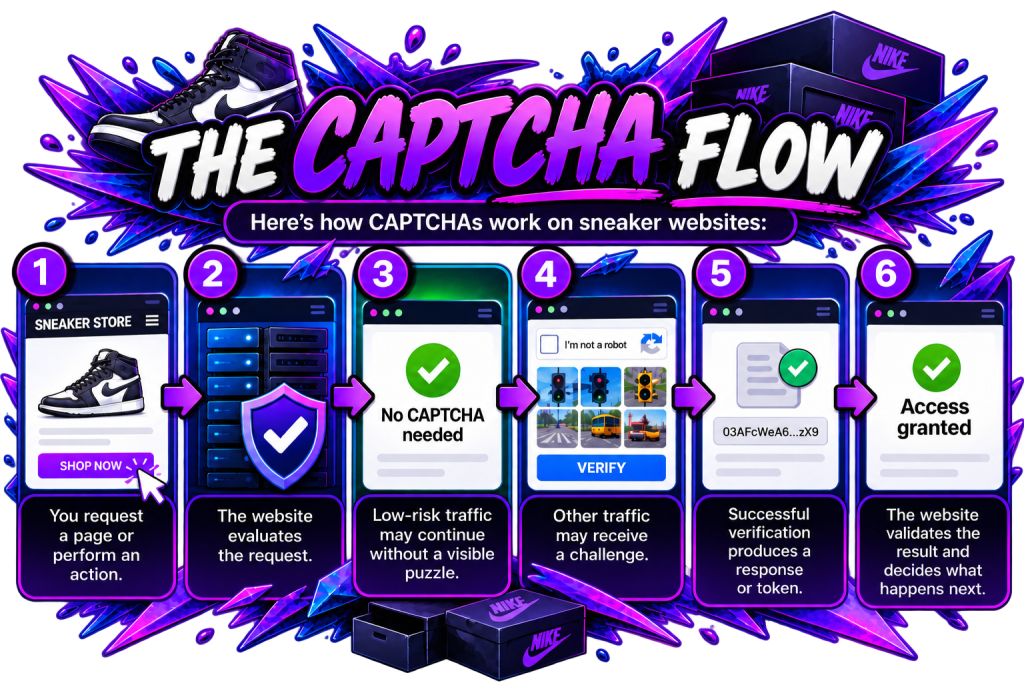
- Request: You request a page or perform an action.
- Evaluation: The website evaluates the request.
- Low-risk traffic: Low-risk traffic may continue without a visible puzzle.
- Challenge: Other traffic may receive a CAPTCHA challenge.
- Verification: Successful verification produces a response or token.
- Validation: The website validates the result and decides what happens next.
That’s a better picture of how CAPTCHAs work on sneaker websites in 2026 than the old idea that everyone simply has to prove they can recognize a bus.
How Do CAPTCHAs Work on Sneaker Websites?
A CAPTCHA is one checkpoint inside a retailer’s security process. Depending on the site, it can appear around login, account creation, product access, or checkout.
Modern verification is often adaptive. Google’s reCAPTCHA v3, for example, returns a risk score from 0.0 to 1.0, with 1.0 representing an interaction that Google’s model considers very likely legitimate. The website decides what to do with that score.
Cloudflare Turnstile can also run JavaScript challenges in the browser without displaying a traditional image puzzle.
Behind that decision, security systems can evaluate several types of information at once. Browser characteristics, traffic and IP signals, session behavior, and the result of any previous challenge can all contribute to how a request is treated.
Lower-risk traffic may continue without a visible CAPTCHA. Other traffic may receive additional verification, either as a visible puzzle or a background challenge.
That’s why the CAPTCHA itself is only one part of the process. What you see on screen can be the result of checks that started before the challenge ever appeared.
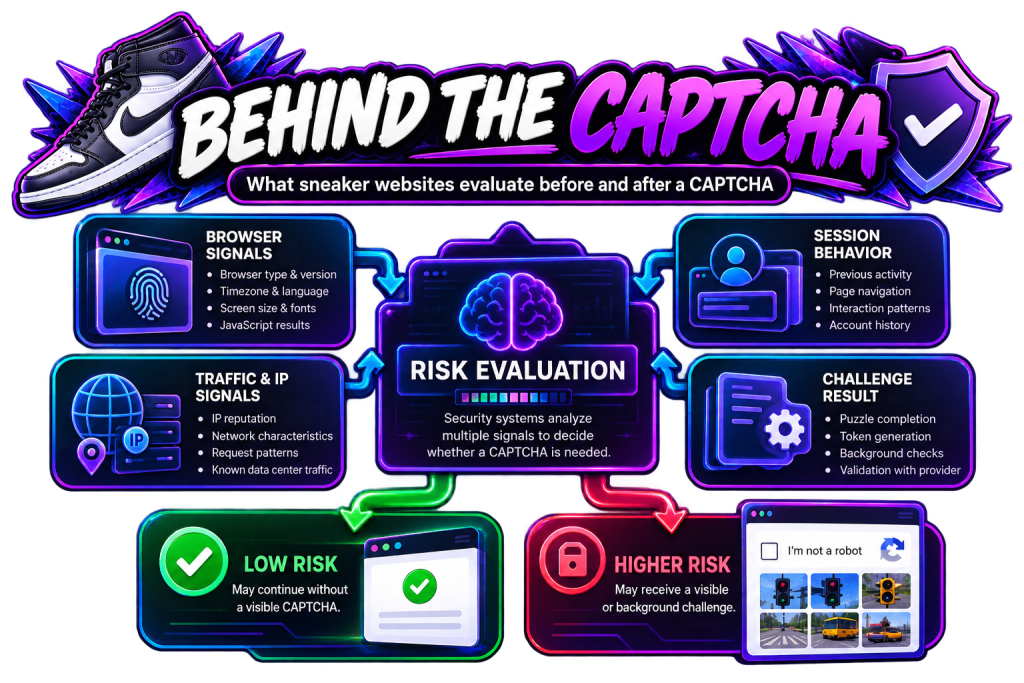
Behind the CAPTCHA
Browser signals
- Browser type and version
- Timezone and language
- Screen size and fonts
- JavaScript results
Traffic and IP signals
- IP reputation
- Network characteristics
- Request patterns
- Known data center traffic
Session behavior
- Previous activity
- Page navigation
- Interaction patterns
- Account history
Challenge result
- Puzzle completion
- Token generation
- Background checks
- Validation with provider
Risk evaluation: Security systems analyze multiple signals to decide whether a CAPTCHA is needed.
Low risk: May continue without a visible CAPTCHA.
Higher risk: May receive a visible or background challenge.
What Does a CAPTCHA Actually Check?
Modern CAPTCHA systems can assess more than whether you clicked the correct squares. The exact signals depend on the provider, website, configuration, and challenge being used.
Google describes reCAPTCHA v3 as an adaptive risk-analysis system. Cloudflare says Turnstile can run non-interactive JavaScript challenges and examine aspects of the browser environment.
This overlaps with the wider anti-bot setup.
As we covered in TSB’s guide to how sneaker websites detect bots, retailers and their security providers can consider browser characteristics, request patterns, IP reputation, JavaScript results, network information, and session behavior rather than relying on one giveaway.
A CAPTCHA result can therefore become one signal inside a larger risk decision.
Are All Sneaker CAPTCHAs Image Puzzles?
No. Modern CAPTCHA systems do not always require a visible puzzle.
Google’s score-based implementation can evaluate an interaction without interrupting the user. Cloudflare Turnstile supports managed, non-interactive, and invisible modes, with its managed option deciding whether interaction is necessary.
That makes the familiar image grid only one possible experience.
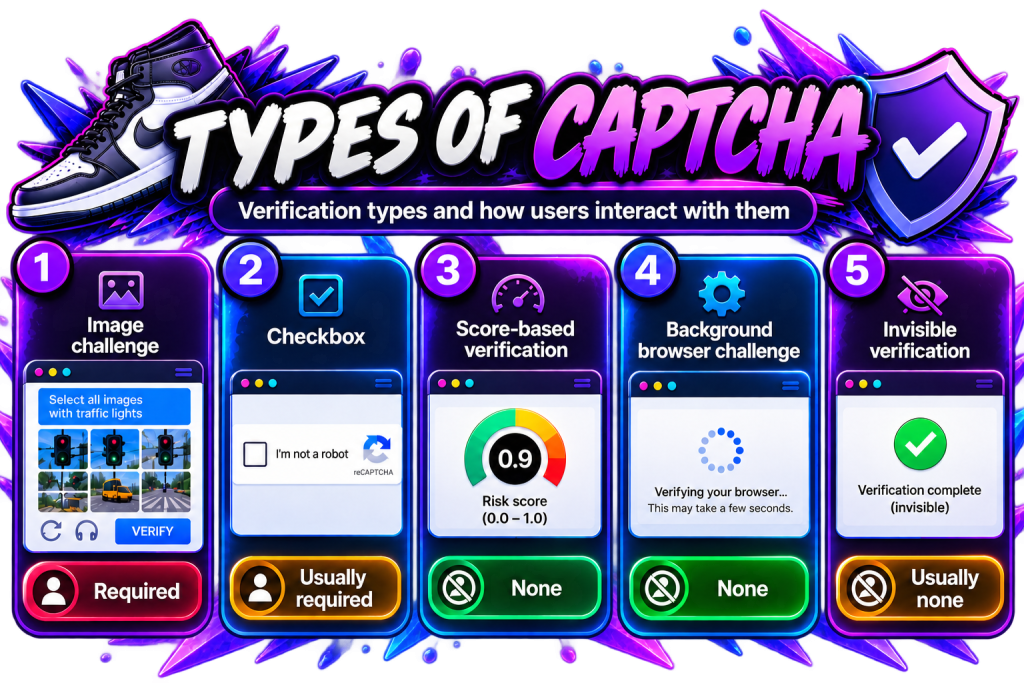
| CAPTCHA type | User interaction |
|---|---|
| Image challenge | Required |
| Checkbox | Usually required |
| Score-based verification | None |
| Background browser challenge | None |
| Invisible verification | Usually none |
So saying “I didn’t get a CAPTCHA” doesn’t necessarily mean no verification happened.
What Happens When You Pass a CAPTCHA?
Passing a CAPTCHA normally gives the website something it can validate. It doesn’t automatically permit you to buy the sneaker.
Cloudflare Turnstile issues a token after successful verification, which the website validates through Cloudflare’s Siteverify API. Google’s reCAPTCHA also uses server-side verification. Google says reCAPTCHA v3 tokens expire after two minutes, so verification needs to happen close to the protected action.
Think of it like getting your wrist stamped before entering another part of a venue.
You passed that checkpoint. It doesn’t mean the sneaker is still in stock, your payment will pass, or the retailer will accept the final order.
That distinction matters during releases where CAPTCHA, queueing, inventory, payment checks, and order validation can all happen separately.
Why Do Sneaker Websites Trigger CAPTCHAs?
Sneaker websites use CAPTCHAs when an interaction requires additional verification. Getting one doesn’t necessarily mean the retailer has decided you’re botting.
Risk systems can consider multiple signals. These may include browser information, network characteristics, previous session activity, request behavior, or other data supported by the site’s security provider.
TSB’s guide to browser fingerprinting for sneaker botting explains the browser side in more detail. Browser version, timezone, language, fonts, settings, and display characteristics can all contribute information.
But fingerprinting is still only one piece.
The useful mental model isn’t “CAPTCHA detected me.” It’s “the site decided this action needed verification.”
Does Getting More CAPTCHAs Mean You Have Been Detected?
Not necessarily. More CAPTCHAs tell you that more verification is being requested. They don’t tell you exactly why.
Suppose two sessions each make 20 requests. One gets no visible challenge while the other gets three. We can see the difference, but we cannot conclude which signal caused it.
The sessions could differ in IP reputation, cookies, browser characteristics, timing, previous activity, or another factor invisible to the shopper.
Our guide on why sneaker proxies get banned or blocked covers the same problem from the network side. Changing an IP only changes one part of what a retailer may see.
More CAPTCHAs are a symptom. They aren’t a complete diagnosis.
How Do CAPTCHAs Fit Into Sneaker Anti-Bot Systems?
CAPTCHA is one layer in a broader anti-bot stack, not a complete sneaker-bot detector.
Modern websites can combine network, browser, request, session, and behavioral information. Cloudflare publicly documents bot-detection methods across its products that include heuristics, JavaScript detections, and machine-learning systems.
A simplified flow could therefore look like this:
Request → traffic analysis → browser checks → risk decision → CAPTCHA → validation → protected action
The implementation differs between websites.
CAPTCHA also isn’t the same thing as a queue. A sneaker queue controls or stages access when demand is high. CAPTCHA handles verification.
A retailer can use both during the same release, and getting through one does not automatically clear the other.
How Do CAPTCHAs Affect Sneaker Bots?
CAPTCHAs matter to sneaker bots because automation still has to interact with whatever verification sits in the purchase flow.
A sneaker bot can automate supported release tasks, but the retailer still controls its security rules, inventory, and checkout.
Consider two otherwise identical checkout attempts. One proceeds immediately while the other gets held for another verification step. The second now has an extra dependency before it can continue.
But speed isn’t the only issue.
Completing a CAPTCHA does not erase the other information attached to the session. The retailer may still evaluate network, browser, account, payment, inventory, and order-level information elsewhere.
CAPTCHA is a checkpoint, not a magic pass.
Can Proxies Affect CAPTCHA Frequency?
Proxies change the network identity associated with traffic, so they can matter when IP reputation or network information contributes to risk analysis. They don’t control the entire decision.
A fast proxy could repeatedly encounter challenges while another IP maintains a more usable session. Raw ping measures speed. It does not tell you whether the retailer trusts the traffic.
We covered that distinction in proxy speed vs success rate.
Changing an IP also does not automatically change the browser environment, cookies, account behavior, request pattern, or payment information.
If CAPTCHA frequency changes after switching proxies, that observation can be useful. It still doesn’t prove the proxy was the only cause.
Why Can Two Users Get Different CAPTCHA Experiences?
Two shoppers can receive different verification because modern systems can make adaptive decisions instead of giving everybody the same puzzle.
Google’s reCAPTCHA v3 evaluates interactions and returns a score from 0.0 to 1.0. The website can choose its response according to its own threshold and context.
Cloudflare Turnstile can similarly determine whether additional interaction is required.
That means three shoppers hitting the same protected action could potentially experience background verification, a checkbox, or different treatment based on the site’s rules.
The exact decision remains specific to the retailer and security provider.
So “same drop” doesn’t necessarily mean “same CAPTCHA experience.”
Can Passing a CAPTCHA Guarantee Checkout?
No. Passing a CAPTCHA only clears that verification step.
It doesn’t reserve inventory, guarantee queue priority, approve payment, or guarantee that the retailer will keep the order.
TSB’s guide to sneaker order cancellations covers how purchase limits, payment problems, addresses, fraud scoring, inventory issues, and later validation can still affect an order.
A release can involve several separate gates:
Traffic accepted → verification → product access → cart → payment → order validation → shipment
Not every retailer follows that exact sequence, but the distinction matters.
A CAPTCHA W is not automatically a sneaker W.
Is CAPTCHA the Same as Browser Fingerprinting?
No. CAPTCHA and browser fingerprinting are different systems, although they can overlap inside the same security stack.
Browser fingerprinting uses a collection of browser characteristics to identify or classify a browser. CAPTCHA is a verification mechanism that distinguishes legitimate interactions from suspicious or automated ones.
Browser information could contribute to a risk assessment, which could then influence whether additional verification appears. That does not make the fingerprint itself a CAPTCHA.
The same distinction applies to proxies, queues, rate limits, and order cancellations. They’re connected parts of sneaker-site security and release infrastructure, but they aren’t interchangeable.
What Should You Take Away From All This?
CAPTCHAs on sneaker websites are verification checkpoints inside a much larger security and purchase process.
The visible puzzle is not the whole system. Modern products such as reCAPTCHA and Turnstile can perform risk analysis or browser checks without forcing every shopper to identify crosswalks, buses, or motorcycles.
For botters, that means you shouldn’t automatically blame CAPTCHA problems on one variable. Challenges can sit alongside IP reputation, browser characteristics, request patterns, sessions, accounts, queues, inventory, payments, and later order validation.
The simple version is this:
A CAPTCHA is a checkpoint, not the finish line. Passing it means you cleared that verification step. The retailer still decides what happens next.
More Than a Checkbox: The Puzzle Behind the Drop
CAPTCHAs might look like a quick checkbox or a simple puzzle, but there’s a lot more happening behind the scenes when sneaker sites get busy. And when it comes to the bigger release-day picture, TSB has some numbers of its own: 1M+ items secured and $50M+ in profit generated by members overall.
If CAPTCHAs are another piece of the sneaker botting puzzle you’re getting to know, your TSB key can be one more piece you bring to the bigger picture.